
МФ Life: All-in-One Mobile Assistant
Overview
МФ Life is a desktop application developed by МегаФон, designed to serve as a comprehensive mobile assistant for users of the МегаФон network. The software functions as a centralized hub, integrating essential tools such as a personal account manager, calling services, and an electronic wallet. Its primary purpose is to streamline access to key telecommunications and financial services, reducing the need to switch between multiple platforms. The application is tailored for consumers and professionals who rely on МегаФон services and seek a unified interface for managing their account, payments, and communications.
Users can monitor package balances, access customer support through online consultants, track points history, and manage multiple accounts across devices. The integration of calling features supports both GSM and Life calls, with contact synchronization to ensure seamless communication. The electronic wallet enables a wide range of financial operations, including payments via the "Korti Milli" card, QR code transactions, fund transfers between balances, and automatic payments. A dedicated cashback balance and enhanced financial history with category filters provide deeper insight into spending patterns.
Real-world usage scenarios include daily bill payments, tracking mobile and data usage, managing loyalty points, and organizing recurring payments. The ability to view transaction details for up to three days and export them as PDFs adds practical value for record-keeping. The developer did not provide additional system requirements.
Key Features & Capabilities
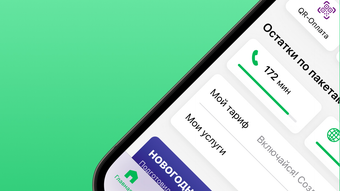
- Personal Account Dashboard – Displays real-time package balances, points history, and quick access to customer support. Supports multiple accounts and cross-device synchronization.
- Unified Calling Interface – Enables users to make GSM and Life calls directly from the desktop. Contacts are synchronized for easy access and management.
- Electronic Wallet Integration – Facilitates payments using the "Korti Milli" card, QR code transactions, and transfers between balances and wallets.
- Automated Payment System – Supports recurring and automatic payments, including interbank and foreign bank card transfers.
- Enhanced Financial Tracking – Offers a unified history of all financial operations with diagrams, category filters, and export to PDF for offline review.
- Cashback Management – Maintains a separate balance for cashbacks, with an improved section for tracking and using rewards.
These features allow users to manage their telecommunications and financial activities from a single interface. For example, a user can check their data balance, make a payment via QR code, and schedule an automatic bill payment—all without leaving the application. The ability to view transaction details for three days and download them as PDFs supports personal finance management and tax preparation. The developer did not specify additional capabilities beyond those listed.
User Interface, Workflow & Performance
The user interface of МФ Life is designed for clarity and efficiency, with a layout that prioritizes quick access to core functions. The main dashboard presents key account information at a glance, including package balances and points history. Navigation is structured around clearly labeled sections, allowing users to move between the personal account, calling tools, and electronic wallet with minimal effort.
Workflow efficiency is enhanced by features such as contact synchronization and automatic payment setup. Users can initiate transactions with few clicks, and the system retains previous settings for recurring actions. The application supports multiple accounts and devices, enabling consistent access across platforms. However, exact performance details were not specified by the developer.
General performance observations are based on typical behavior of similar desktop utilities. The application is expected to operate smoothly on standard hardware, though specific CPU or RAM usage was not provided. Stability and responsiveness appear to be consistent with standard desktop software, but real-world testing data was not shared. The developer did not specify resource usage details.
Compatibility & System Requirements
МФ Life is available for both Windows and Mac operating systems. The software version is 1.0.0, with a download size of 200 MB. This indicates a lightweight installation that should not place significant strain on system resources.
Platform compatibility information is limited to the listed operating systems. Exact system requirements were not listed. The developer did not provide details on minimum hardware specifications, such as processor speed, RAM, or disk space beyond the file size. Users are advised to ensure their system meets general desktop application standards for optimal performance.
Pros and Cons
Pros
- Centralized management of telecom and financial services
- Support for multiple accounts and cross-device access
- Integrated electronic wallet with cashback tracking
- Automated and recurring payment options
- PDF export for transaction records
- Free to download and use
Cons
- No detailed system requirements provided
- Performance data not disclosed
- Compatibility limited to Windows and Mac
- Three-day transaction view may be restrictive for long-term analysis
- Only available for МегаФон users
FAQ Section
Is МФ Life available for free?
Yes, МФ Life is available at no cost. The software is offered free of charge to users of МегаФон services.
Can I use МФ Life on both Windows and Mac?
Yes, the application supports both Windows and Mac operating systems. Users can install and run it on either platform.
Is the software secure?
While specific security measures were not detailed, the application is developed by МегаФон, a trusted telecommunications provider. Users are advised to follow standard security practices when managing financial data.
How often does the software update?
Updates are released as needed to improve functionality and security. The latest version is 1.0.0, with future updates managed through the official distribution channels.
Can I use МФ Life offline?
Basic features such as viewing saved transaction history and accessing account data may be available offline. However, real-time functions like payments and balance checks require an active internet connection.
Final Thoughts
МФ Life delivers a robust, all-in-one solution for МегаФон users seeking a streamlined way to manage their mobile and financial activities. Its integration of account management, calling tools, and a comprehensive electronic wallet sets it apart as a practical desktop utility. The inclusion of automated payments, cashback tracking, and PDF export enhances its value for everyday users.
While the lack of detailed system requirements and performance data limits deeper evaluation, the application’s core functionality is well-structured and user-friendly. It is especially beneficial for МегаФон customers who want a centralized platform for managing services and finances. The free pricing model further increases its accessibility.
For users looking to simplify their digital life within the МегаФон ecosystem, МФ Life offers a compelling solution. Download МФ Life now.







